
Broadcast branding is often treated as a creative exercise, but in a live environment it functions as a control system. A consistent visual and audio identity helps crews, presenters, and automation systems make quick decisions during high-pressure moments, reducing error rates and improving handoffs between teams.
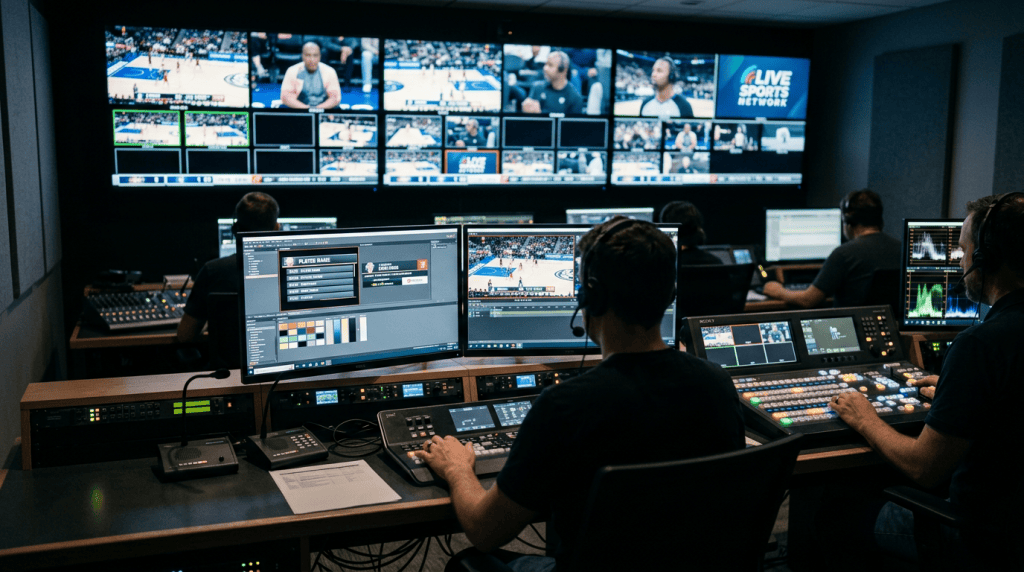
Beyond internal benefits, live broadcast branding anchors commercial relationships. Sponsors buy predictable exposure; rights holders demand consistent on-air presentation. When those expectations are met reliably, renewals and premium placement follow. When they are not, disputes and compensation demands are common.
Table of Contents
The visible layers: what viewers actually notice
Viewers register brand through a handful of on-screen elements that recur every minute: station BUGs, lower thirds, full-screen idents, opening stings, and set visuals. These are the touchpoints that define broadcast visual identity in the viewer’s mind and they must be prioritized in rundown design and NLE deliverables.
On-camera branding stretches beyond logos. Camera framing, lens choice, color temperature, and talent wardrobe all influence perceived continuity. A mismatch between studio lighting and a branded graphic palette breaks immersion quickly; harmonizing those elements should be part of every pre-show tech check.
Lower thirds and information density
Lower thirds are the workhorses of on-camera branding: they convey identity, context, and credibility simultaneously. Design them to be legible at common viewing distances and across aspect ratios, and ensure templates handle variations in name length and titles without truncation.
Operationally, lower thirds belong in the MOS or automation storyline. Graphics operators should have validated templates tied to the NRCS to prevent manual composition during live pushes. That eliminates most of the human-error cases seen in fast-paced news and sports coverage.
Logo bugs and persistent IDs
Station BUGs—small, persistent logos—are prime real estate and high-risk items. They sit on-screen for long durations, so their contrast, placement, and interaction with lower-thirds must be tested across content. Avoid placing critical readouts under where a BUG might sit during a super-low-latency live stream.
When rotating sponsor logos or single-event variants are used, automate rotation logic in the graphics engine rather than relying on manual swaps. A single miscue with a sponsor BUG during a replay sequence can cause contractual penalties and viewer complaints within minutes.
For physical brand presence on camera, custom microphone flags complement on-screen graphics with a visible logo on every microphone that appears in the frame.
Audio as brand: the overlooked identity layer
Audio and video branding operate together; sound cues can create instant recognition even when visuals are obscured. Short theme stings, voiceover signatures, and consistent room tone help audiences orient to a brand, particularly in noisy or mobile environments.
In live broadcast, audio branding must be integrated into the audio console workflows. Stings should be assigned to channels with proper gain staging and gating. A misrouted sting or an unmuted cue track is more damaging than a misplaced graphic because sound interrupts attention immediately.
Voice talent and sonic continuity
On-camera branding includes the human voice. A consistent announcer or a clearly defined voice style—warm, authoritative, brisk—anchors the on-air persona. Contractually, keep voice presets and pronunciation guides in the NRCS to preserve continuity when talent rotates.
Production teams should maintain an audio asset library with labeled stems: full mix, music bed only, sting only, and source-file metadata. During live events the ability to pull a clean sting versus a mixed bed saved a network from a mid-broadcast clash with international feed audio.
Where branding fits into the broadcast production workflow
Branding in television production must be visible in workflow documents, not just deliverable specs. Rundowns, call sheets, and automation scripts need explicit branding slots—who triggers what, when, and where the asset lives. That prevents last-minute guesswork and duplicated assets across systems.
In most facilities, broadcast branding touches editorial, graphics, AE, master control, and legal. Make responsibility clear: who approves the final on-air BUG? Who owns the color-grading LUT? Assigning ownership avoids the “it’s someone else’s problem” mentality that generates late-night ructions.
Integrating broadcast branding into rundowns and NRCS
Templates in the NRCS should include a branding layer indicator for each story—graphics, stings, sponsor cues—so the operator sees dependencies at a glance. This is especially important during live sports or breaking news where stories are re-ordered and assets must follow.
Automated playout systems can read metadata tags from the NRCS and load the correct graphics package in the playout server. Implementing that integration reduces the need for manual intervention and lowers the chance of branding mismatches when a story is extended or shortened.
Testing and rehearsals as brand safety
Branding in live streaming and traditional broadcast alike benefits from rehearsal cycles where branding elements are exercised under real operating conditions. Simulate last-minute sponsor swaps, picture-in-picture transitions, and multi-region play-ins to discover edge-case failures.
Technical rehearsals should include failure-mode drills: what happens if the graphics engine crashes? If the stinger fails? Document fallback assets and hand signals for studio operators so that the on-air team can maintain a brand face under pressure.
Practical design constraints: legibility, scale, and motion
Designers and engineers must collaborate on asset specifications. A richly animated ident that looks great in a 4K promo may become an illegible, distracting element when downconverted to mobile. Design within the lowest common denominator and enhance for higher-fidelity outputs rather than the reverse.
Motion design needs operational limits: maximum animation length for stingers, safe zones for translation-safe titles, and fade durations that sit well with codec behavior. Short, purposeful motion reads reliably across encoders and prevents micro-stutter artifacts that betray low-latency workflows.
Aspect ratio and platform parity
Broadcast visual identity is fragile across aspect ratios. Elements designed for 16:9 may be cropped in social clips or repurposed for 9:16 vertical streams. Create master assets that can be modularly composed into multiple ratios instead of separate one-off variations that drift over time.
Maintain a “safe-area” grid in your templates and enforce it in asset checks. Automation can verify whether a logo or lower-third encroaches on critical visuals for alternate ratios, catching problems before they reach the airchain.
Technical limits and compatibility: codecs, HDR, and latency
Branding that relies on subtle gradients or translucent overlays can behave unpredictably under aggressive compression. Test brand visuals at operational bitrates and across target codecs; what reads in a mezzanine file may collapse into banding or color shifts on-the-fly encodes.
HDR workflows introduce additional challenges. A logo tint that looks correct in SDR might burn or clip in HDR. Include LUT-driven versions of branding elements in your asset management so operators can pick the right files for the deliverable format.
Branding in live streaming: different rules, same demands
Branding in live streaming often faces lower production budgets but higher fragmentation. Streams run concurrently on multiple platforms with varying UI overlays and native branding requirements. Plan for the lowest-common-platform constraints while taking advantage of each platform’s strengths.
Interactive elements—chat overlays, donation tickers, and dynamic sponsor panels—create richer engagement but higher operational risk. Define clear rules for user-generated content moderation and set time-limited overlay slots to protect the primary broadcast identity.
Latency, interactivity, and on-screen identity
Low-latency streams allow synchronized graphics and interactive polls, but with that power comes coordination costs. A poll result displayed five seconds ahead of the score in a live sports feed undermines credibility. Align data sources and clock references across motorized graphics, stat feeds, and scoreboard systems.
Platform branding requirements must be respected. For instance, some platforms demand persistent player-level branding or require a visible channel label. Bake those constraints into your encoder and CDN configurations to avoid downranking or takedowns.
Operational scenarios: sponsor inserts and compliance
Sponsor obligations are not abstract. They have contractual durations, positional rules, and creative limitations. Rehearse sponsor insertions as operational cues, not last-minute graphic swaps, and codify the exact seconds of visibility required for fulfillment reporting.
Compliance goes beyond sponsorship. Regulatory IDs, emergency alerts, and legal bugs need guaranteed placement. Design your broadcast branding layers so that mandatory overlays can be inserted automatically without destroying the visual hierarchy of your on-screen identity.
Real-world scenario: sports replay and sponsor conflicts
In a regional sports broadcast, replay packages sometimes overlay sponsor logos from fed scoreboard graphics. If a replay originates from an international feed with conflicting sponsor rights, the local team must mask or replace those identifiers. Preparing modular graphics that can be swapped at the graphics engine level prevents on-air conflicts and sponsor breaches.
Operationally, this requires mapping foreign feed layers to local template slots, having replacement assets preloaded, and a fast decision tree for the graphics operator. That map should live in the playbook and be validated during the initial technical checklist for the event.
Case studies: news, sports, and corporate live events
Newsrooms rely on consistent branding to convey trust and continuity across morning, midday, and evening editions. A single evening newscast that adopted a new color palette without adjusting lower-third contrast experienced a measurable drop in on-screen readability for viewers on mobile, prompting an immediate rollback.
Sports productions often feature aggressive broadcast branding through overlays, sponsor animations, and in-venue LED signage. Successful broadcasts keep these elements modular so replay systems, highlight packages, and condensed post-game clips inherit consistent branding without manual rework.
Corporate live events present different constraints: the brand owner usually demands strict color control and logo usage. In one large town-hall production, failure to supply institutionally approved LUTs caused the live feed to look markedly different from the staged visuals, prompting re-encoding of the VOD at significant cost.
When extending brand identity to microphones, custom branded foam windshields can be colour-matched to institutional standards and delivered ready for broadcast use.
Tools of the trade: engines, servers, and asset management
Graphics engines, NRCS integrations, media asset management systems, and automation servers form the technical backbone for reliable media production branding. Choose tools that support template-driven workflows and metadata passing to avoid manual interventions during live events.
Template versioning is critical. When a graphics template evolves, archived rundowns referencing older versions must continue to play back correctly. Implement strict asset versioning in the MAM and reflect dependencies in the NRCS metadata fields.
| Element | Typical owner | Common tools | Failure modes |
|---|---|---|---|
| Lower thirds | Graphics operator/Editor | Vizrt, Chyron, Ross XPression | Wrong template, truncation, font mismatch |
| Audio stings | Audio engineer/Producer | Ableton, Pro Tools, console cues | Wrong track, level issues, stinger stutter |
| BUGs and idents | Brand manager/Automation | Playout servers, automation logs | Overlapping IDs, incorrect rotation |
| Social clips | Digital content team | NLEs, transcoding farm | Wrong aspect ratio, missing safe area |
Measurement: how to know if broadcast branding works
Effectiveness metrics differ by objective. For recognition and recall use controlled A/B tests or short surveys. For contractual fulfillment, rely on automated logs: uptime of a BUG, number of stingers played, and clip exposure timestamps. Treat logs as financial records during audits.
Operational KPIs include template error rates, manual overrides, and time-to-deploy for last-minute artwork. Track these in post-show reports and use them as inputs to the change-control board for template improvements and training programs.
Attribution in multi-platform delivery
Attribution for sponsor impressions is complicated by platform UIs and third-party clips. Use watermarking and analytics on primary streams, and retain clip-level logs for social uploads. In many cases, the legal remedy for brand exposure requires timestamped video proof tied to master control logs.
When dynamic ad insertion is used in OTT feeds, coordinate ad-marker signals (SCTE-35 or similar) with the graphics timeline. Misaligned markers can lead to brand content being cut or duplicated in stitched VOD files, eroding sponsor trust.
Governance and change control for brand assets
Media production branding needs a governance model as soon as multiple teams touch assets. A central brand steward should define versioning rules, approval workflows, and archival policies. This reduces ad hoc modifications that create on-air inconsistency.
Change control is especially important for live events where brand elements might be modified for region-specific messaging. Require a two-person sign-off for any on-air graphic introduced within 48 hours of a show, and log approvals in your NRCS for legal traceability.
Approval workflows and emergency changes
Design an emergency change protocol for last-minute sponsor or regulatory edits. Include a fast-track sign-off list with contact numbers, a pre-approved set of fallback assets, and an operator checklist for swap procedures. Practicing this protocol reduces expensive on-air mistakes.
Keep a lightweight audit trail: time-stamped confirmation emails or NRCS notes suffice. During disputes, production that shows a documented approval sequence will typically prevail over informal recollections.
Training and culture: making branding a shared responsibility
Branding excellence is cultural as much as technical. Regular cross-discipline workshops—graphics with TDs, audio with producers—help teams understand mutual constraints. Practical drills are more effective than design-only critiques.
Include branding modules in operator onboarding and periodic retraining. Cover common failure scenarios, the location of master assets, and the exact hand-off points between editorial and operations. Familiarity breeds speed and reduces the friction of live shows.
Future directions: dynamic, data-driven, and personalized branding
Emerging practices in broadcast production workflow are moving branding toward data-driven systems. Dynamic graphics that react to real-time stats or user preference allow more relevant displays; however, they demand robust data validation and latency guarantees to avoid on-air errors.
Personalization—showing different sponsor calls-to-action by region or subscriber tier—will increase in OTT but requires careful mapping to contractual rules and brand identity. Build modular graphics and metadata-first pipelines now to make future personalization achievable without retooling the entire stack.
Automation and AI: useful, but not a substitute for governance
Automation reduces manual touchpoints for repetitive broadcast branding tasks: template fills, scheduling, and rotation logic. AI can assist in asset tagging and QC but should not be trusted to make legal or sponsorship decisions. Maintain human sign-off for any algorithmic change that affects commercial visibility.
Design AI checks to flag anomalies—logo contrast issues, missing acceptable sponsor windows, or mismatched LUTs. These flags should feed into human review queues with clear severity levels so engineers and creatives can prioritize remediation.
Practical checklist for executing reliable live brand identity
The following checklist distills operational best practices into actionable items production teams can adopt across newsrooms, OB trucks, and streaming operations. Use it as a pre-show anchor and a post-show audit sheet to continuously improve.
- Embed branding slots in the NRCS and link to specific asset IDs.
- Maintain a single-source MAM with version control and approved LUTs.
- Automate BUG rotation and sponsor stinger triggers where possible.
- Run technical rehearsals covering failure modes and sponsor swaps.
- Assign clear ownership for each visual and audio branding element.
- Log every on-air branding change with time-stamped approvals.
- Test assets across target codecs, bitrates, and aspect ratios.
- Include audio branding in console cue lists and gain-staging checks.
- Measure template error rates and manual overrides after every show.
- Practice emergency change protocols with contact lists and fallback assets.
Final practical notes from the control room
Broadcast branding in television production succeeds when technical choices are married to editorial discipline. A beautiful graphic is only as good as the process that gets it on-air at the right time, at the right place, and for the right duration. Building that process requires cooperation across systems, people, and schedules.
Small, repeatable controls are the most powerful: standardized templates, automated metadata passing, and rehearsed escalation paths. Those are the moments where brand integrity survives the chaos of live shows and where branding in live broadcast truly earns its place on the schedule.
FAQ
Where does broadcast branding fit in the production workflow?
Branding should be embedded directly in rundowns, call sheets, and automation scripts — not treated as a deliverable afterthought. Every story in the NRCS should carry explicit branding slots: which graphics fire, when, and where the assets live. That structure prevents last-minute improvisation during live shows.
What tools are typically used to manage on-air graphics and branding?
Common graphics engines include Vizrt, Chyron, and Ross XPression for lower thirds and overlays. BUGs and idents are usually handled through playout servers and automation logs. Audio stings run through the console cue list. The key is that all these tools should pull from a single-source MAM with version control — not from local folders that drift over time.
How do you prevent branding errors during live broadcasts?
The most effective controls are structural: validated templates tied to the NRCS, automated BUG rotation rather than manual swaps, and technical rehearsals that simulate real failure modes — graphics engine crashes, last-minute sponsor changes, and multi-region feed conflicts. Manual intervention during live shows is where most errors originate.
How should sponsor broadcast branding be managed operationally?
Sponsor insertions should be rehearsed as operational cues with defined durations, positional rules, and pre-loaded fallback assets. Rotation logic for sponsor BUGs should be automated in the graphics engine. Every on-air appearance needs to be logged with timestamps — those records serve as proof of fulfillment during audits and disputes.
How do you measure whether broadcast branding is working?
Measurement splits into two tracks. For contractual fulfillment: automated logs tracking BUG uptime, stinger count, and clip exposure. For recognition and recall: controlled surveys or A/B tests. Operationally, track template error rates and manual overrides per show — those numbers reveal where the workflow is fragile.
What technical factors can cause branding to fail on delivery?
Subtle gradients and transparent overlays are vulnerable to compression artifacts at operational bitrates. HDR workflows can cause logo tints to clip or burn compared to SDR references. Assets designed for 16:9 may be cropped in vertical or social formats. All branding elements should be tested across target codecs, bitrates, and aspect ratios before going live — not just in mezzanine quality.
What’s the minimum governance structure needed for live branding?
At minimum: a single brand steward who owns versioning and approval workflows, a two-person sign-off rule for any asset introduced within 48 hours of air, and a documented emergency change protocol with a fast-track contact list and pre-approved fallback assets. The audit trail doesn’t need to be complex — timestamped NRCS notes or confirmation emails are sufficient for most legal purposes.